Describes the functionality of hit count for access policy rules, which allow users to track traffic matching access rules within specific time ranges for improved policy visibility and analysis.
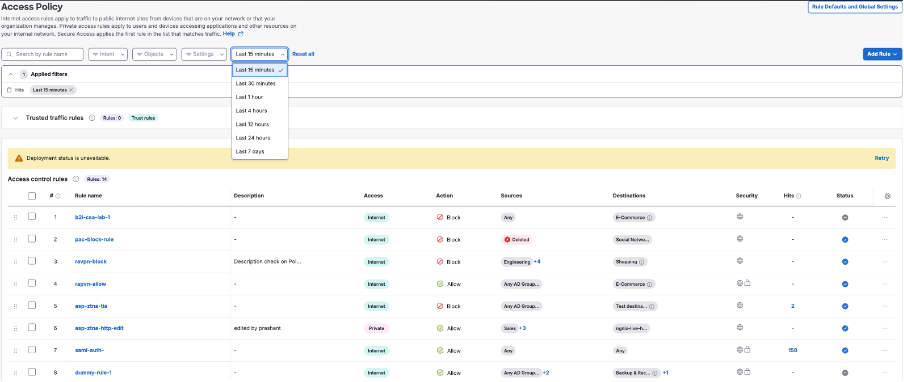
Hit count for access policy rules helps you understand how often the listed access rules have matched traffic within a selected time range. The hits filter on the Access Policy page lets you view hit counts for a selected duration, rather than relying solely on the default hit count time range of 7 days.
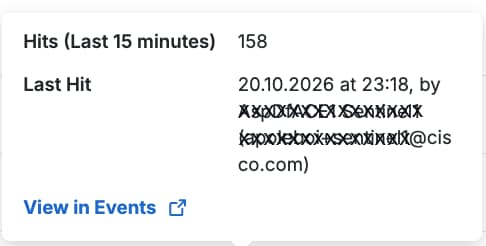
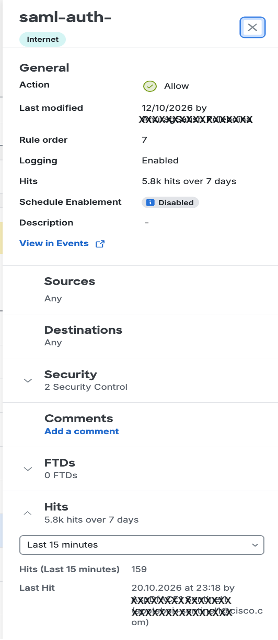
The hits filter feature also introduces a clickable link for the hit count value in the Hits column of the rules tables that shows the rule hit-count activity. These tables include Trusted traffic rules table, Access control rule table, Hybrid mesh firewall (HMF), and the Managed Security Service Provider (MSSP) Manager and Managed rule table. You can open the Events page from the hit-count popover for deeper investigation. The same hit count context is available from the rule drawer as well.
Supported time ranges
By default, the Hits column in the rules table reflects activity from the last 7 days. You can change the duration by selecting a different time range from the hits filter.
The hits filter supports these time ranges: Last 15 minutes, Last 30 minutes, Last 1 hour, Last 4 hours, Last 12 hours, Last 24 hours, and Last 7 days.
The Last 15 minutes, and Last 30 minutes options in the hits filter are available only for the managed organizations; not for the MSSP manager organizations.