Bypass Authentication in Secure Web Appliance
Available Languages
Introduction
This document describes how to bypass authentication in Secure Web Appliance (SWA).
Prerequisites
Requirements
Cisco recommends that you have knowledge of these topics:
- SWA administration.
Cisco recommends that you have these tools installed:
- Physical or Virtual SWA
- Administrative Access to the SWA Graphical User Interface (GUI)
Components Used
This document is not restricted to specific software and hardware versions.
The information in this document was created from the devices in a specific lab environment. All of the devices used in this document started with a cleared (default) configuration. If your network is live, ensure that you understand the potential impact of any command.
Exempt Authentication
Exempting authentication for certain users or systems in the Cisco SWA can be crucial for maintaining operational efficiency and meeting specific requirements. Firstly, some users or systems require uninterrupted access to critical resources or services that could be hindered by authentication processes. For example, automated systems or service accounts performing regular updates or backups need seamless access without the delays or potential failures introduced by authentication mechanisms.
Additionally, there are scenarios where the web service provider recommends not using a proxy to access their service. In such cases, exempting authentication ensures compliance with the provider guidelines and maintains service reliability. Furthermore, to effectively block traffic for certain users, it is often necessary to first exempt them from authentication and then apply the appropriate blocking policies. This approach allows for precise control over access permissions.
In some instances, the web service being accessed is trusted and universally acceptable, such as Microsoft updates. Exempting authentication for such services simplifies access for all users. Moreover, there are situations where the user operating system or application does not support the configured authentication mechanism in the SWA, necessitating a bypass to ensure connectivity.
Lastly, servers with fixed IP addresses that do not have user logins and have limited, trusted Internet access do not require authentication, as their access patterns are predictable and secure.
By strategically exempting authentication for these cases, organizations can balance security needs with operational efficiency.
Methods for Exempting Authentication in Cisco SWA
Exempting authentication in SWA can be achieved through various methods, each tailored to specific scenarios and requirements. Here are some common ways to configure authentication exemptions:
- IP Address or Subnet Mask: One of the most straightforward methods is to exempt specific IP addresses or entire subnets from authentication. This is particularly useful for servers with fixed IP addresses or trusted network segments that require uninterrupted access to the Internet or internal resources. By specifying these IP addresses or subnet masks in the SWA configuration, you can ensure that these systems bypass the authentication process.
- Proxy Ports: You can configure the SWA to exempt traffic based on specific proxy ports. This is useful when certain applications or services use designated ports for communication. By identifying these ports, you can set up the SWA to bypass authentication for traffic on these ports, ensuring seamless access for the relevant applications or services.
- URL Categories: Another method is to exempt Authentication based on URL categories. This can include both predefined Cisco categories and custom URL categories that you define based on your organization specific needs. For example, if certain web services, such as Microsoft updates, are deemed trusted and universally acceptable, you can configure the SWA to bypass authentication for these specific URL categories. This ensures that all users can access these services without the need for authentication.
- User Agents: Exempting authentication based on user agents is useful when dealing with specific applications or devices that do not support the configured authentication mechanisms. By identifying the user agent strings of these applications or devices, you can configure the SWA to bypass authentication for traffic originating from them, ensuring seamless connectivity.
Steps to Bypass Authentication
Here are the steps to create an Identification Profile to exempt from Authentication:
Step 1. In the GUI, Choose Web Security Manager and then click Identification Profiles.
Step 2. Click Add Profile to add a profile.
Step 3. Use the Enable Identification Profile check box to enable this profile, or to quickly disable it without deleting it.
Step 4. Assign a unique profile Name.
Step 5. (Optional) Add Description.
Step 6. From the Insert Above drop-down list, choose where this profile is to appear in the table.

Note: Position Identification Profiles that do not require authentication on top of the list. This approach reduces the load on the SWA, minimizes the authentication queue, and results in faster authentication for other users.
Step 7. In the User Identification Method section, choose Exempt from authentication/ identification.
Step 8. In the Define Members by Subnet, Enter the IP addresses or subnets to which this Identification Profile applies. You can use IP addresses, Classless Inter-Domain Routing (CIDR) blocks, and subnets.
Step 9. (Optional) Click Advanced to define additional membership criteria, such as, Proxy Ports, URL Categories or User Agents.

Caution: In transparent proxy deployment, SWA cannot read user agents or the full URL for HTTPS traffic unless the traffic is decrypted. As a result, if you configure the Identification Profile using User Agents or a Custom URL Category with regular expressions, This traffic fails to match the Identification Profile.
For more information about how to configure Custom URL Category, visit: Configure Custom URL Categories in Secure Web Appliance - Cisco

Tip: The policy uses an AND logic, meaning that all conditions must be met for the ID profile to match. When Advanced options are set, every single requirement must be satisfied for the policy to apply.
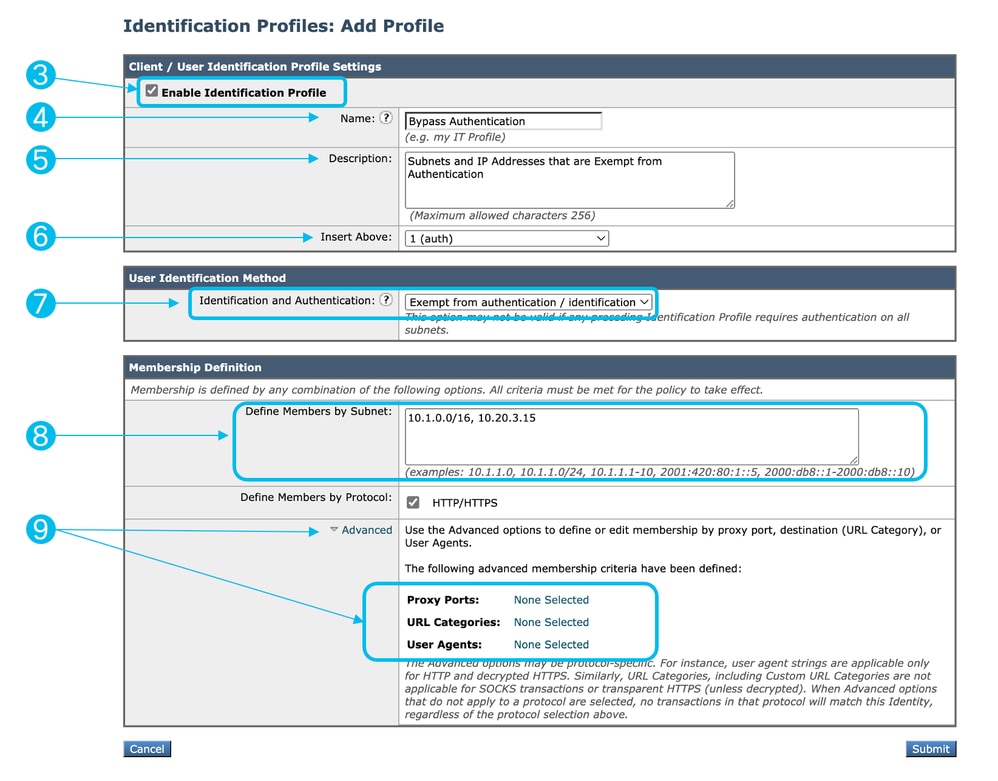 Image - Steps to Create ID profile to Bypass Authentication
Step 10. Submit and Commit changes.
Related Content
- User Guide for AsyncOS 15.0 for Cisco Secure Web Appliance - GD(General Deployment) - Classify End-Users for Policy Application [Cisco Secure Web Appliance] - Cisco
- Configure Custom URL Categories in Secure Web Appliance - Cisco
- How To Exempt Office 365 Traffic From Authentication and Decryption on Cisco Web Security Appliance (WSA) - Cisco
Revision History
| Revision | Publish Date | Comments |
|---|---|---|
2.0 |
21-Oct-2026
|
Recertification - Updated Formatting |
1.0 |
07-Oct-2024
|
Initial Release |

 Feedback
Contact Cisco
- Open a Support Case

- (Requires a Cisco Service Contract)