Site-to-Site Connectivity with Overlapping Subnets in Cisco Secure Access
Available Languages
Introduction
This document describes the overlapping subnet solution in Cisco Secure Access.
Prerequisites
Requirements
Cisco recommends that you have knowledge of these topics:
- Cisco Secure Access administration
Cisco recommends that you have:
- Administrative Access to Cisco Secure Access
Components Used
This document is not restricted to specific software and hardware versions.
The information in this document was created from the devices in a specific lab environment. All of the devices used in this document started with a cleared (default) configuration. If your network is live, ensure that you understand the potential impact of any command.
Before You Begin
In this example, there are two branch sites that use the same IP subnet, 192.168.200.0/24, and are connected to Cisco Secure Access through two separate IPsec tunnels.
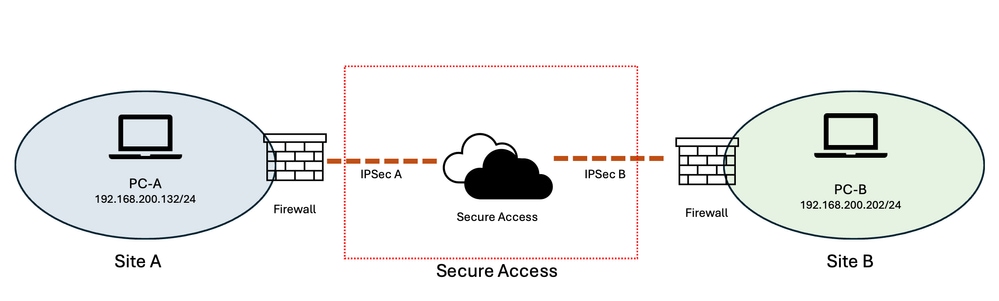 Image - Network Diagram
The goal is that users from Site A can access resources in Site B, and vice versa.
Preparing and Planning
Because both sites use the same IP subnet (192.168.200.0/24), the overlapping address space prevents direct communication between the two sites. To resolve this overlap, two non-overlapping virtual subnets are assigned to represent the resources at each site.
For this example:
-
Site A: 10.30.30.0/24
-
Site B: 10.40.40.0/24
-
Actual subnet at both sites: 192.168.200.0/24
The virtual subnets provide unique address spaces for each site while the actual resources continue to use their existing 192.168.200.0/24 addresses.
When a user at Site A accesses a resource in Site B, the user accesses it through the Site B virtual subnet (10.40.40.0/24) rather than directly using the overlapping 192.168.200.0/24 address space.
Cisco Secure Access provides a One-to-One Destination NAT (D-NAT) feature that can translate the virtual addresses to the corresponding real addresses. The D-NAT address range has the same size as the original subnet. In this example, both the virtual and actual networks are /24 subnets, providing a one-to-one mapping between the virtual and real IP addresses.
For example:
10.40.40.202 → 192.168.200.202
Therefore, a request from Site A destined for 10.40.40.202 is translated by D-NAT to 192.168.200.202, allowing the request to reach the corresponding resource at Site B despite both sites using the same underlying IP subnet.
This approach effectively creates a virtual, non-overlapping address space for each site while preserving the existing IP addressing of the resources. It also provides a consistent one-to-one relationship between the virtual and real addresses, making the configuration easier to understand, manage, and troubleshoot.
Configuration Steps
The configuration therefore consists of two sections:
-
Configuring Destination NAT (D-NAT) in Cisco Secure Access for one network tunnel. (In this example, Site B)
-
Configuring Static Routing in Cisco Secure Access for other network tunnel. (In this example Site A)
Configuring Cisco Secure Access
Step 1: From the Cisco Secure Access management portal, navigate to Connect > Network Connections and select the Network Tunnel Groups tab.
Step 2: Edit the Network Tunnel Group associated with the IPsec tunnel for the site that uses the overlapping subnet.
In this example:
-
IPsec-A = Network Tunnel Group for Site A
-
IPsec-B = Network Tunnel Group for Site B
Step 3: Click the three-dot menu next to the required Network Tunnel Group and select Edit.
Step 4: For Site B, configure the Destination NAT Mappings,
Step 4-1: From the left-hand menu, select the Routing tab and enable Network Address Translation (NAT) if it is not already enabled.
Step 4-2: Under Destination NAT Mappings, click Add Mappings.
Step 4-3: Use this table to configure the D-NAT mappings for the Network Tunnel Group.
Step 4-4: Save the changes.
Step 5: For Site A, configure the Static routing,
Step 5-1: From the left-hand menu, select the Routing tab and enable Static Routing if it is not already enabled.
Step 5-2: Enter the subnets and the virtual subnet in IP Address Ranges, section.
Step 5-3: Use this table to configure the routing for the Network Tunnel Group.
Step 5-4: Save the changes.
| Site A - IPsec Tunnel |
Site B - IPsec Tunnel |
|
| Destination NAT-1 |
N/A |
Site → Secure Access Original CIDR:192.168.200.0/24 Translated CIDR: 10.40.40.0/24 |
| Destination NAT-2 |
N/A |
Secure Access → Site Original CIDR: 192.168.200.0/24 Translated CIDR: 10.30.30.0/24 |
| Routing |
IP Address Ranges: 10.40.40.0/24 192.168.200.0/24 |
N/A |
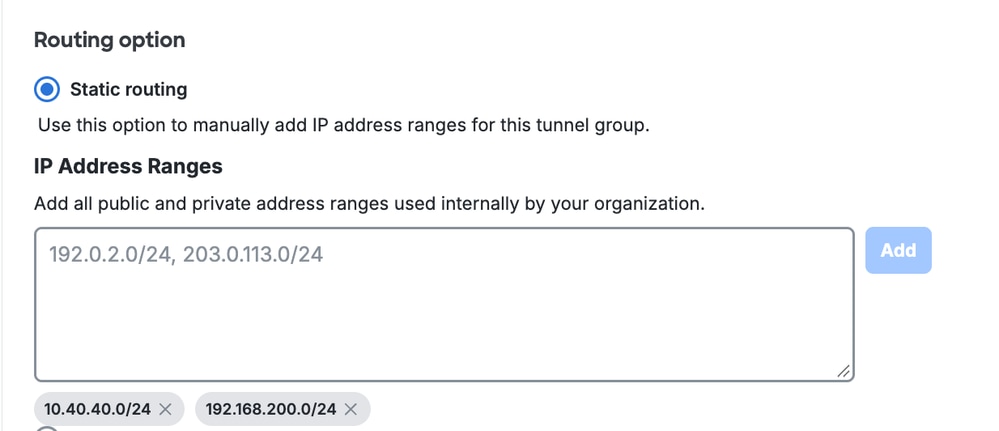 IPsec Tunnel Site A - Static Routing Configuration |
 IPsec Tunnel Site B - D-NAT Configuration |
Related Content
Cisco Secure Access NAT Mapping / Network Tunnel Group Configuration
Cisco Secure Access Network Tunnel Group Configuration and Routing Reference
Cisco Secure Access Troubleshooting and Basic-data Collection Guide
Revision History
| Revision | Publish Date | Comments |
|---|---|---|
2.0 |
29-Oct-2026
|
Recertification - Updated Formatting |
1.0 |
13-Aug-2026
|
Initial Release |

 Feedback
Contact Cisco
- Open a Support Case

- (Requires a Cisco Service Contract)